
Google Echo – An Inclusive Social Media Experience
COMPANY
Google + California College of the Arts
ROLE
Interaction Design, UI/UX Design, UX Research, Design Strategy, Mobile App Design
TEAM
5 Designer (Including Me)
TIMELINE
2 days (12 Hours)
CHALLENGE
Help under-represented users and niche communities form communities, advocate for diversity, equity, inclusion, and belonging of identities, and cultivate online culture through new digital platforms. We were to explore social-graph spaces and paradoxical problems to develop solutions that promote these outcomes and align with the opportunity presented by the open web.
SOLUTION
Echo is a social media app developed for people who are visually impaired — focused on audio-based entertainment, navigated through gesture touch-based interactions.
DESIGN STRATEGY
Brainstorming the Product Design Direction
Problem Statement

All together, we analyzed the Google Design Sprint brief — forming "How Might We" statements based on the challenges we were trying to form a solution for. We each voted on three statements; from those, the top 3 HMWs.
By reframing the problem statements, we narrowed down to the question,
"How might we create an inclusive and accessible community that effectively engages and supports a diverse range of users?"
Crazy 8's

We used the HMW statement to each create 8 different ideas that can be a solution for our problem. At this stage, we were focusing on quantity over quality, so simple sketches or words were okay.
Value Matrix

We then used a Value Matrix to map out where our ideas landed on the range of inclusion and value. We voted and landed on our top 3 ideas that had a high impact on inclusion.
Top 3 Ideas:
-
AI that filters content based on one’s visual needs.
-
A social media platform that can use without vision.
-
AI that explains memes to people who are visually impaired.
Feedback:
After presenting our ideas to our mentor, suggested that we go all the way; not just accommodate our product to those who are visually impaired.
Problem Statement
While our mentor was giving us feedback, an idea sparked in my mind. I immediately started sketching some interaction ideas for an audio-based social media platform navigated through touch-based gestures. The team loved the idea, so we decided to move forward with it.

PROTOTYPES
Showcasing Interactions Using Prototypes
Low-Fidelity Prototypes
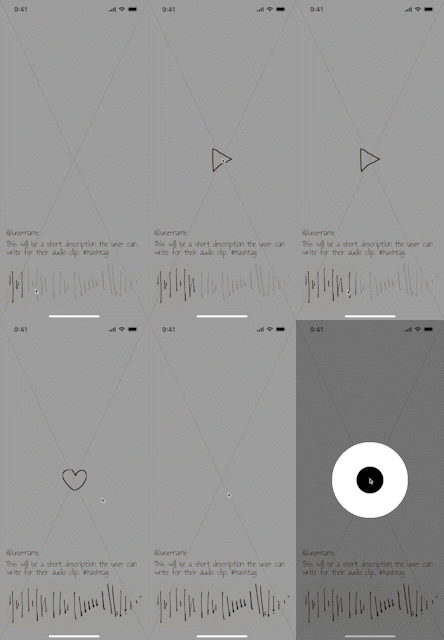

After seeing the low-fidelity prototypes in action, we decided to combine both concepts, as they both offered impactful benefits to those who have visual impairments and are blind.
Feedback:
-
We would keep the center-screen animation reflecting the audio frequency.
-
Swipe and tap-based interactions would be used.
-
We would include an automated closed captioning option.
-
Include an extra preventative step for leaving a voice comment
-
No audio scrolling as entertainment content would be short-form.
High-Fidelity Prototype

Time was precious, so we incorporated the feedback directly into the high-fidelity prototype. Again, highlighting every important feature throughout the experience.
USABILITY TESTING
Testing How Intuitive it is for Users to Navigate Using Gestural Interactions

We provided the testers with a sheet of the interactions (not as artfully developed), gave them tasks, and observed them as they reproduced the actions to navigate.
Feedback:
-
Having the AI-generated closed captions be accent-friendly.
-
Having an option for people to use text-to-speech to prevent discrimination against those that have speech impediments or accents.
-
Adding additional affordances for users to be reminded of the interactions, especially for first-time users.
We presented our high-fidelity prototype to another team. Though they do not have visual imparities, they are in the age group we were designing for and are avid social media users.
FINAL PRODUCT
Prototype Run-Through

CONCLUSION
My Takeaway
STRENGTHS
Rapidly developed a product design concept in 2 days using Google's user-centered design process
Produced an inclusive and accessible social media experience that met the brief's needs
Each member contributed their expertise in UX, interaction, and visual design
NEXT STEPS
Moving forward, we will examine how Echo can be more sociable by interacting with creators directly. We will also work on scoping out this asynchronous workflow through unique interactions with smart headsets and smartwatches. Further interactions can be added with technological advancements in haptics and gesture control.
LO-FI WIREFRAMES
Demonstrating Product Directions Through Low-Fidelity Wireframes
Based on the sketches, we decided to move forward with two concepts since they offered contrasting directions and benefits. Concept A focused more on touch-based gesture interactions, which allowed for more free navigation anywhere on the screen. Concept B's interactions were solely tap-based, which offered less of a risk of interference with their smartphone's screen reader but constrains users to interact with specific sections of the screen to navigate.
